
Twrp is one recovery that you must have, because of its vastness it's widely accepted by most android users. Twrp is always required when flashing ROMS, Zips and other files via your recovery, this guide will show you how to install twrp successfully on your Xiaomi Redmi Note 4X[mido]

Requirement
Step 1: Install adb or minimal adb and fastboot drivers on your pc
Step 2. Download twrp-mido.img and follow step 3
Step 3. Copy twrp downloaded in step 2 and paste in adb folder located in C:\adb on your pc
Step 4. Hold SHIFT key and right click
Folder should look like this

Step 5. Open cmd window and type the following commands fastboot flash recovery twrp-mido.img and hit enter

Step 6. Boot your phone into fastboot mode[power key + vol down]
Step 7. Plug phone to pc and wait for twrp to be flashed
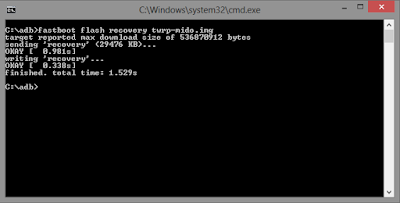
Twrp should successfully flashed as indicated in the image above
Step 7. Boot into Twrp Recovery

If your bootloader is unlocked CLICK HERE to unlock
Required files
TWRP FOR MIDO
ADB and FASTBOOT drivers
Minimal Adb and Fastboot Drivers

Requirement
- Unlocked Bootloader
- Twrp[link at the end of this post]
- PC
- Usb cord
- Adb or minimal adb and fastboot drivers
Step 1: Install adb or minimal adb and fastboot drivers on your pc
Step 2. Download twrp-mido.img and follow step 3
Step 3. Copy twrp downloaded in step 2 and paste in adb folder located in C:\adb on your pc
Step 4. Hold SHIFT key and right click
Folder should look like this

Step 5. Open cmd window and type the following commands fastboot flash recovery twrp-mido.img and hit enter

Step 6. Boot your phone into fastboot mode[power key + vol down]
Step 7. Plug phone to pc and wait for twrp to be flashed

Twrp should successfully flashed as indicated in the image above
Step 7. Boot into Twrp Recovery

If your bootloader is unlocked CLICK HERE to unlock
Required files
TWRP FOR MIDO
ADB and FASTBOOT drivers
Minimal Adb and Fastboot Drivers


